
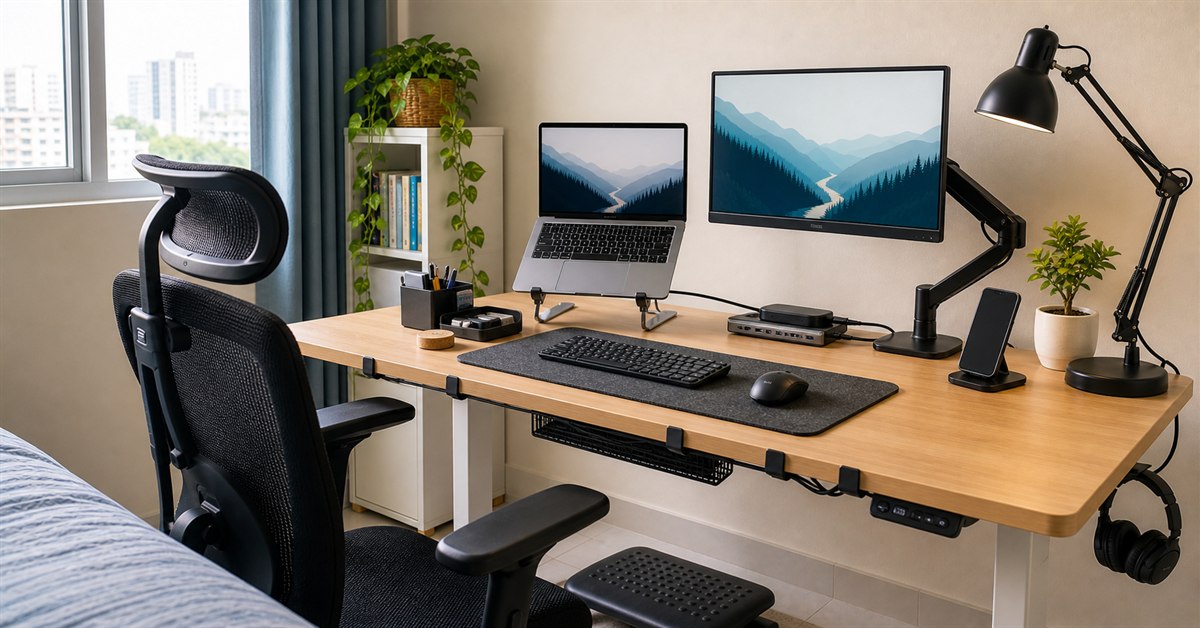
The best desk accessories in the Philippines are not the cute ones you forget after a week. They are the practical upgrades that make your desk easier to use every day: better screen height, less cable clutter, cleaner typing space, stronger lighting, safer power, and more room on a small table.
If you already read our work-from-home setup guide, this is the accessory-focused follow-up. A chair, desk, laptop, and internet connection are the foundation. Desk accessories are the smaller pieces that make the setup feel less improvised.
This 2026 guide is for Filipino WFH workers, students, freelancers, BPO staff, online teachers, and hybrid workers building a desk in a condo, bedroom, dorm, apartment, or family sala.
TL;DR: best desk accessories Philippines 2026
| Accessory | Best for | Typical budget |
|---|---|---|
| Laptop stand | Laptop posture | ₱300-₱1,500 |
| Monitor arm | Desk space and screen height | ₱1,200-₱4,500 |
| Desk mat | Mouse movement and cleaner work surface | ₱200-₱900 |
| Cable clips/ties/tray | Cable clutter | ₱100-₱1,500 |
| Footrest | Shorter users and better seated posture | ₱300-₱1,500 |
| USB-C hub | Laptop ports and docking | ₱500-₱3,500 |
| Phone stand | Calls, OTPs, and second-screen use | ₱100-₱800 |
| Desk organizer | Pens, chargers, receipts, and small tools | ₱150-₱1,200 |
| Desk lamp | Night work and video calls | ₱300-₱2,500 |
| Surge-protected extension cord | Safer power setup | ₱500-₱2,000 |
If you only buy three: get a laptop stand or monitor arm, cable management, and a desk mat. Those three make a messy Philippine home desk feel much more intentional.
Our top picks
- BEST POSTURE FIXLaptop Stand₱300-₱1,500Check price
- BEST SPACE SAVERMonitor Arm₱1,200-₱4,500Check price
- BEST CHEAP UPGRADEDesk Mat₱200-₱900Check price
- BEST CLUTTER FIXCable Management Kit₱100-₱1,500Check price
- BEST ERGONOMIC ADD-ONFootrest₱300-₱1,500Check price
How we chose these desk accessories
Desk accessories were evaluated by practical impact, not desk-aesthetic popularity:
- Does it improve posture, reach, screen height, or typing comfort?
- Does it save space on small desks common in Philippine rooms?
- Does it reduce cable clutter or power risk?
- Is it useful for WFH, study, and hybrid work?
- Is it available through Philippine marketplaces or local stores?
- Is it affordable enough to make sense before luxury upgrades?
We also considered the ergonomic basics behind workstation guidance: screen height, chair and desk fit, keyboard and mouse reach, lighting, and foot support. Accessories should support those fundamentals, not distract from them.
The best desk accessories in the Philippines
Laptop Stand
Our verdict: The best first accessory for laptop users because it fixes the low-screen problem that causes neck hunching.
A laptop stand is the cheapest way to make laptop work feel less cramped. It raises the screen closer to eye level, frees the laptop keyboard from being your main typing surface, and makes the setup easier to pair with an external keyboard and mouse.
For Filipino students and hybrid workers, a foldable aluminum stand is usually enough. It packs into a bag, fits a dorm desk, and works in coffee shops or coworking spaces. For permanent WFH, choose a sturdier stand or a monitor riser style that does not wobble while typing.
The key rule: do not raise the laptop and keep typing on the built-in keyboard all day. Once the laptop is lifted, add an external keyboard and mouse. Otherwise, your wrists end up too high.
What we like
- Cheap posture improvement
- Portable options available
- Frees desk space under some risers
- Works with external keyboard and mouse
- Useful for WFH and hybrid work
Watch out for
- Needs separate keyboard and mouse for best ergonomics
- Cheap folding stands can wobble
- Tall stands may not fit low shelves
- Not all stands support heavy gaming laptops
Monitor Arm
Our verdict: The cleanest way to reclaim desk space and set your screen at the right height.
A monitor arm clamps to the back of your desk and lifts the monitor off the tabletop. That gives you more room for a keyboard, notebook, desk mat, laptop, or lunch plate during a long shift. It also makes screen height easier to adjust.
Before buying, check three things: your monitor must support VESA mounting, your desk edge must be strong enough for a clamp, and the arm's weight capacity must match your monitor. Cheap monitor arms can sag if the gas spring is weak or mismatched.
For typical 22-inch to 27-inch WFH monitors, an entry-level gas-spring monitor arm is enough. For ultrawide or heavy monitors, spend more and check real buyer reviews from users with similar screen sizes.
What we like
- Frees desk surface immediately
- Improves screen height and distance
- Great for small desks
- Makes cleaning easier
- Useful for dual-screen setups
Watch out for
- Requires VESA-compatible monitor
- Clamp needs a sturdy desk edge
- Cheap arms can sag
- Installation takes careful adjustment
Desk Mat or Large Mouse Pad
Our verdict: A low-cost upgrade that makes typing, mousing, and cleaning feel better immediately.
A desk mat makes a work surface feel more controlled. It gives your mouse a consistent tracking area, reduces keyboard vibration, protects the tabletop from scratches, and visually defines the work zone on a shared table.
For Philippine homes, avoid mats that are too thick, too fuzzy, or hard to clean. Humidity and dust build up quickly. A washable fabric or PU leather mat is easier to maintain than a delicate decorative mat.
Choose size based on desk width. For an 80cm desk, a 70cm mat may already feel large. For a 120cm desk, 90cm by 40cm is a comfortable size for keyboard, mouse, and notebook.
What we like
- Very affordable
- Improves mouse tracking
- Protects desk surface
- Reduces keyboard noise
- Makes shared desks feel more organized
Watch out for
- Large mats collect dust
- Cheap edges can fray
- Light colors stain easily
- Oversized mats crowd small desks
Cable Management Kit
Our verdict: The most underrated accessory for any desk with a laptop charger, monitor, lamp, fan, headset, and phone cable.
Cable management does not need to be complicated. Start with Velcro ties, adhesive clips, and a small cable box or under-desk tray. Route power cables away from where your chair rolls and keep charging cables from dragging across the floor.
For WFH desks, the best setup is usually a power strip mounted or placed safely under the desk, with charging cables guided to one side. Keep frequently used cables reachable and hide the rest.
Avoid permanent adhesive clips on rental furniture unless you are sure the finish can handle it. Velcro straps and clamp-on cable trays are safer for renters.
What we like
- Cheap and high impact
- Makes cleaning easier
- Reduces cable snags
- Safer than loose floor cables
- Works with any desk size
Watch out for
- Adhesive clips can fail in heat
- Cable trays need desk clearance
- Takes time to set up neatly
- Needs redoing when you add gear
Footrest
Our verdict: A practical fix when your chair or desk height makes it hard to keep both feet flat.
A footrest is especially useful for shorter users, students using adult-sized desks, and anyone whose chair must be raised to match a high desk. If your feet cannot rest flat on the floor, a footrest helps keep your knees and hips more comfortable.
You do not need an expensive footrest. A simple angled plastic footrest, textured platform, or sturdy wooden riser can work. The important part is stable support, not fancy rocking features.
If your chair is too high at its lowest setting, fix the chair first if possible. A footrest helps, but it does not make a badly sized chair perfect.
What we like
- Helpful for shorter users
- Cheap ergonomic improvement
- Reduces leg pressure from high seats
- Useful with fixed-height desks
- Small footprint
Watch out for
- Can slide on tile floors
- Some plastic models feel flimsy
- Not a replacement for correct chair height
- Adds one more item under the desk
USB-C Hub or Dock
Our verdict: Essential for thin laptops that need HDMI, USB-A, SD card, Ethernet, or extra charging access.
Modern laptops often remove the ports that WFH setups still need. A USB-C hub can add HDMI, USB-A, SD card reader, Ethernet, and pass-through charging in one compact accessory.
Before buying, check your laptop's USB-C port capabilities. Not every USB-C port supports display output or charging. If you need an external monitor, make sure the hub explicitly supports HDMI or DisplayPort output from your laptop model.
For office work, a basic 5-in-1 or 7-in-1 hub is enough. For creators or teachers handling large files, choose a hub with better heat management and faster data transfer.
What we like
- Adds missing laptop ports
- Useful for monitors and projectors
- Keeps desk connections in one place
- Portable for hybrid work
- Ethernet models help stable calls
Watch out for
- Compatibility varies by laptop
- Cheap hubs can heat up
- Some do not support display output
- Good docks are expensive
Phone Stand
Our verdict: A tiny accessory that keeps OTPs, messages, calls, and reference material visible without eating much desk space.
A phone stand is useful for WFH because the phone is part of the workday: authentication codes, chat apps, call backup, timers, camera use, and mobile hotspot monitoring. Keeping it upright reduces desk clutter and makes notifications easier to glance at without lifting the phone.
For video calls, a taller or adjustable stand can turn a phone into a decent webcam or secondary camera. For normal desk use, a small weighted stand is enough.
Avoid flimsy plastic stands if you use a heavy phone or thick case. Check whether the stand supports charging while the phone is docked.
What we like
- Very cheap
- Small footprint
- Useful for OTPs and calls
- Can help with phone-as-webcam setups
- Keeps desk cleaner
Watch out for
- Cheap stands tip over
- Some block charging cables
- Not all hold tablets
- Can encourage distraction if overused
Desk Organizer or Drawer Tray
Our verdict: The best low-tech fix for pens, cables, receipts, flash drives, sticky notes, and random desk clutter.
Desk organizers work best when they are boring and specific. A pen cup, drawer tray, cable pouch, or shallow desktop box is often better than a large multi-compartment tower that takes over the desk.
For small Philippine rooms, vertical organizers can be useful, but do not buy one that blocks monitor view or lamp placement. If your desk has a drawer, start with a drawer tray. If it has no drawer, use a compact desktop tray.
The goal is not to display everything. The goal is to reduce decision fatigue: pens in one place, chargers in one place, papers in one place.
What we like
- Cheap clutter control
- Works for students and WFH users
- Keeps chargers and pens easy to find
- Drawer trays hide visual mess
- Many sizes available
Watch out for
- Large organizers can become clutter themselves
- Cheap plastic cracks
- Desktop organizers take surface space
- Needs regular decluttering
Desk Lamp or Clamp Light
Our verdict: A practical accessory for night shift, studying, reading, and making video calls look clearer.
Good lighting makes a desk easier to use. A desk lamp improves reading, writing, keyboard visibility, and video calls without lighting the whole room. In shared bedrooms, that matters.
Clamp lights are especially useful on small desks because they do not take tabletop space. Rechargeable lamps are useful during brownouts, while plug-in lamps are better for permanent desks.
If you use the lamp for video calls, place it slightly above and to the side of your camera. A lamp behind you or below your face can make the video look worse.
What we like
- Improves night work and study
- Useful for calls
- Clamp lamps save desk space
- Rechargeable options help during outages
- Pairs well with laptop stands
Watch out for
- Very cheap lamps may flicker
- Lamp bases can crowd small desks
- Harsh placement creates glare
- Rechargeable batteries age
Surge-Protected Extension Cord
Our verdict: Not exciting, but important for any desk with a laptop charger, monitor, lamp, fan, router, and phone charger.
Many WFH desks grow cable by cable until everything is plugged into one questionable extension cord. A better power strip or surge protector is a practical safety upgrade, especially if you run a monitor, laptop charger, lamp, fan, router, and charging bricks near the same desk.
Buy from reputable sellers and avoid no-name power strips with vague specs. Look for enough outlets, proper spacing for bulky chargers, switch quality, cord length, and Philippine plug compatibility.
Keep power strips away from spills and off flood-prone floors. Cable management and power safety should be handled together.
What we like
- Safer desk power setup
- Reduces adapter stacking
- Useful for monitors, lamps, routers, and chargers
- Cleaner cable routing
- Good units last years
Watch out for
- Quality models cost more
- Surge protection is not a UPS
- Bulky adapters can block outlets
- No-name strips are risky
Best desk accessory bundles by setup
For laptop-only WFH
Start with:
- Laptop stand
- External keyboard and mouse
- Desk mat
- Phone stand
- Cable clips
- Desk lamp
This is the best low-cost setup if you work on a laptop in a bedroom or dining area. Add a monitor later if you need more screen space.
For external monitor setups
Start with:
- Monitor arm
- Cable tray
- Desk mat
- USB-C hub
- Phone stand
- Surge protector
The monitor arm gives the biggest desk-space improvement. Cable management becomes more important once you add monitor power and HDMI or USB-C cables.
For students
Start with:
- Laptop stand
- Desk lamp
- Desk organizer
- Large mouse pad
- Phone stand
- Rechargeable lamp if brownouts are common
Students usually need a mixed study and online-class setup. Keep accessories portable if the desk is shared with siblings or family.
For BPO and call-heavy work
Start with:
- Headset hook or stand
- Cable clips
- Surge protector
- Desk lamp
- Phone stand
- Small organizer
If calls are your job, keep the desk simple. You need fast access to headset, phone, notes, and power without clutter near the microphone.
Desk accessories to skip or delay
Not every popular accessory is worth buying first.
RGB light bars. Fun, but not the first priority unless you already fixed lighting, cable clutter, and posture.
Oversized pegboards. They look good online but can dominate small Philippine rooms. Use one only if you actually need wall storage.
Decorative desk shelves. Useful for large desks, but on small tables they can make monitor height and keyboard placement worse.
Expensive mechanical keyboards. Nice to own, but not as urgent as a laptop stand, monitor arm, chair, or headset.
Novelty organizers. If it holds too many random items, it becomes another clutter zone.
Source and shopping notes
Ergonomic priorities in this guide follow the OSHA computer workstation eTool, especially screen position, keyboard/mouse reach, chair support, and workstation setup. Shopping-safety reminders follow the DTI online shopping safety tips and DTI E-Commerce FAQ.
Price ranges are practical planning ranges for Philippine marketplaces and local retailers. They are not guaranteed live prices. Before buying, check seller ratings, recent Philippine buyer photos, return rules, warranty, material dimensions, clamp compatibility, desk thickness requirements, plug type, and whether the item is from an official store.
No third-party product photos were reused in this post because licensing is not confirmed. The cover image is a project-generated editorial asset.
Read this next
- Best Work From Home Setup Philippines 2026
- Best Laptop Stand Philippines 2026
- Best Monitor Arm Philippines 2026
- Best Ergonomic Chairs Philippines Under ₱5,000
- Best Desk Lamp Philippines 2026
- Best Desk Fan Philippines 2026
- Best Mouse for Work From Home Philippines
FAQ
What desk accessories should I buy first in the Philippines?
Start with the accessories that fix posture and clutter: a laptop stand or monitor arm, external keyboard and mouse, desk mat, cable ties or clips, and a surge-protected extension cord. After that, add a footrest, phone stand, desk organizer, USB-C hub, and lighting based on your work style.
What is the most useful desk accessory for WFH?
For laptop users, a laptop stand plus external keyboard and mouse is the most useful desk accessory combination. For monitor users, a monitor arm is the biggest space and posture upgrade. For messy desks, cable management gives the fastest quality-of-life improvement.
How much should I spend on desk accessories?
A practical starter set costs around ₱1,500 to ₱3,500 if you buy a laptop stand, mouse pad or desk mat, cable clips, and organizer. A fuller WFH accessory setup with monitor arm, USB-C hub, footrest, lamp, and better cable management usually lands around ₱5,000 to ₱12,000.
Are desk accessories worth it for small Philippine rooms?
Yes, but choose accessories that save space rather than add clutter. Monitor arms, vertical laptop stands, under-desk cable trays, clamp lamps, and compact organizers are better for condos, dorms, and shared bedrooms than large decorative accessories.